Edit - June 8 2026: : Proton Pass mention was removed as I stumbled upon a recent news that Proton did a paid partnership with a french far-right youtuber (context from a Reddit link).
They answered saying they weren't aware and will do better, but while they were drafting an answer, they deleted all posts talking about this on their subreddit. Their reply is not bad, but the fact that they spend a good amount of time deleting all posts talking about this and banning people sharing it was a bit too much to my taste. You do what you want with this information.
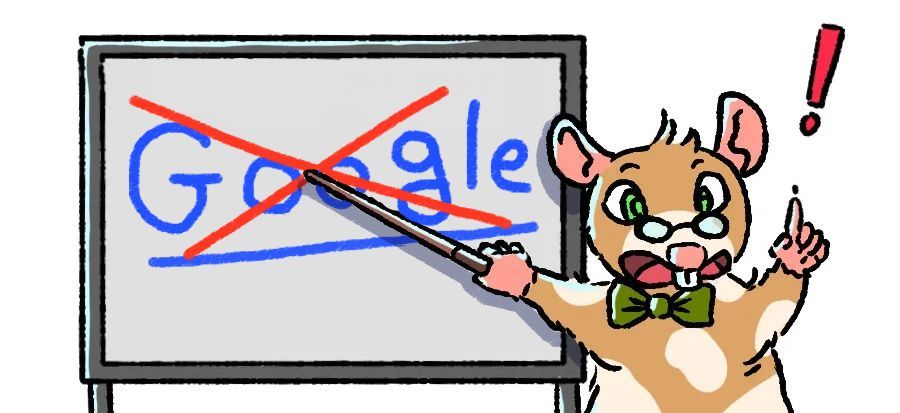
Disclaimer: I'm sharing my own opinion and process through this blog post, these are my own observations and I'm not claiming them to be the absolute best. If you disagree with what I wrote that's okay too. Enjoy Professor Squeako above telling you to ditch Google too.
INTRO
Degoogling your life has been a topic that became more and more popular over the past few years: repeated issues about privacy led to people looking for alternatives, Google destroying their apps and flooding them with ai bullshit... but, it can be a bit daunting to start from scratch after years spent on relying on a single company for all your online needs.
Good news is, you are not alone in this! Many people have built lists over the years, rassembling in online communities to ask for recommendation and share their new favorite softwares. I will share with you my process, what I use now and the options that I deem interesting. I will also focus on the organisation part.
I used the word "Degoogle" in the title and intro, even if it means removing google from your live, it also has a broader definition. Every big tech company needs to be avoided if you care about your privacy: Google, Microsoft, Meta... to list the most infamous. Degoogling is intrinsically connected with online privacy, which can be hard to achieve online. My posts won't be about how to achieve the best privacy online but rather about how you can leave big tech, be ressourceful and not feel defeated in front of these giant corps.
When going down this road, one of my additional goals was also to clean my online presence. If I can inspire you to do the same I'll be happy! I want to be real though, it's not always easy and it can be frustrating at times... but I also find it very freeing to make my own choices and not be stuck in a rotting online environment.
PREPARATION IS KEY!
I personally rely a lot on lists and spread sheets to tackle difficult tasks like this. Before picking any new service to subscribe for what is important to do is to re-familiarize yourself with what you already have: email, drive, social media accounts... anything where you have a presence online!
I feel like it's really hard to do a hard split between services and softwares you access on your PC and ones you access on your phone. I'm going to try my best to stay PC only, as degoogling a phone is another can of worm... feel free to read my previous blogpost How water damage on my phone led me to de-google my life (and more).
With that said, pick the medium of your choice (I recommend Joplin though, it's an incredible note app available on ALL platforms) and start writing that list. I'm going to share the one I made for our company's accounts to give you an example:
Service: Namecheap
Used for:
- Domain name
- Website hosting
- Main Website
Service: Social Medias
List:
- Bluesky
- Mastodon
- Twitch
- Youtube
- Rednote
- Discord
- Stoat
Service: Google
Used for:
- Drive (listing the files that goes into the drive)
- Youtube
- Web search
Service: Wave
Used for:
- Accounting
Service: Robo Streamer
Used for:
- Steam page streaming
And the list goes on... I hope that'll give you ideas on how to organize yours.
Next Step was to identify what I could get rid of: I personally had way too many things in my google drive, and had a few different accounts I created over the years that I had no need of (email is actually a very huge step so I'm going to leave it for the next blog post). I find it interesting to evaluate these kind of things because we were made to think we absolutely need access to an online drive at all time, but do you really?
Maybe you need one for reasons and that's okay, these questions are here mostly to challenge the needs you have right now so you can leave google services more easily.
The main things I wanted to change were:
• Web search engine
• Multiple google email
• Google Calendar
• Google drives
• Google photo backup
• Google Authenticator
• Microsoft account
• Facebook
• Whatsapp
An advice would be to NOT rush the list, it can take time to remember what services you're using online. Sometimes you've stopped using them for so long you don't even remember it was there. The most important here is to take a step back and make sure you haven't forgotten anything. Keep a physical notepad or file on your PC if you prefer, but make it easy to find and format, so you can add new items fast.
Your list could also include one of these:
• Web browser
• Music Streaming account
• Password manager
Fast forward a few days/weeks later: you got your list, know what?!
START SMALL, DON'T BURN OUT
With your list in hand, you can start working on the items that take less work to switch: the easiest switch I've made was to use a new search engine for web queries. Using a different web browser was also relatively fast to do, you can often export all your favorites in one click as well as your saved login if you use that.
◎ SEARCH ENGINE:
In term of search engine I found a couple that gave me great results:
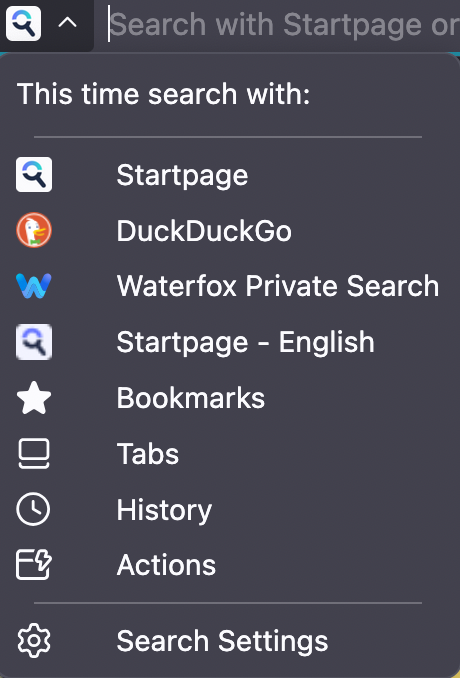
- Startpage
- DuckDuckGo (note that I linked the NoAI search for DuckDuckGo because no one needs ai)
So far, that's the easiest to change, no account or anything. These are my personal recommendations because I've been using them personally, but others exist too. What I look for in a search engine is privacy and no ai (at least not pushed on my face, as it's hard to avoid a search engine that implements it).
🐁 You can always change the default search engine in your browser. Taking example from Firefox: you can add and remove any search engine you want. You can also swap them at will when you are on a new tab, no need for google search anymore!
You can also modify if your home page or an empty tab has a web search or not.
(honestly the google web search is so bad now, you're not losing anything)
◎ WEB BROWSER:
When I looked at web browsers, I realized that many of them were chromium-based: meaning they come from an open source web browser code maintained by google called Chromium. It's the base for google chrome, as well as many other browsers like Opera, Brave, Microsoft Edge, etc.
Since the goal is to degoogle, I would recommend you pick a browser that is not chromium-based. Now, I know some websites will not be working properly if you're not using one, so I have Vivaldi installed on my PCs in case I need to access a website that's not working on my usual browser.
Initially, I was using Firefox as my main browser, but with a couple of recent decisions they made regarding ai implementation into the browser, I didn't feel like I wanted to use Firefox anymore. Fortunately, there are many forks of Firefox out there! (A fork is a software built from the base of another but with changes made to make it distinct) My choice landed on Waterfox, as I liked how it felt and looked, after using it for a bit. You can find a list of the main Firefox-based web browser from this article, honestly none of them are a bad choice, some do have a few base settings like deleting cookies on close, disabling Firefox Sync, etc. You can change them, just be aware that it'll be enabled by default. Choose what you feel matches the best your usage.
Waterfox was a good choice for me because I use two different PCs so I wanted to keep my bookmarks in sync using Firefox Sync, it was still providing enough privacy options to make it worth the change for me. For a true private experience I recommend to enable uBlock Origin and/or Privacy Badger as extensions on your browser.
Switching web browser is an easy feat as you can very easily export all your bookmarks and passwords (if you're using your it as a password manager) and import them back into another web browser.
To recap the key points:
▢ Find your new browser (preferably non-Chromium based)
▢ Export your bookmarks & passwords
▢ Import them back into the new browser
▢ Install extensions to improve privacy
▢ Optional: keep a chromium-based browser that is not Chrome or Edge in case a website is not working for you
From time to time, a few websites won't work on Waterfox. I'm either being blocked or it doesn't load and make it looks like the website is broken... sometimes, even payment is stuck. But I encounter these issues so rarely that I don't mind at all, and if this is the price to pay to have a better privacy, so be it.
◎ PASSWORD MANAGER:
I admit, for years I didn't really know password managers existed, let alone realized I was actually using one, it was just in my web browser! If you've been saving your passwords in your web browser you're also using a password manager. One key takeaway I got from reading a lot of experiences from people who managed to free themselves from big tech is that you don't want to put all your eggs in the same basket. And I agree.
This is why after using Firefox to store all my password for years, I moved away from using it this way, and found another software focused on it. I used Bitwarden for a while but after a recent change of CEO I think I'm going to move away and try something else.
For password managers you usually have two types: Cloud based and offline. I understand not everyone can or want to self host, some people won't care at all because they're not using multiple machines, as always, make the choice based on your usage!
Here is a list from It's FOSS featuring a good range of free open source options both cloud and offine, you can also always find paid options that are popular like RoboForm or Dashlane. Many of them will also have extensions for your web browser for autofill options, if that's something you use (I don't recommend it, privacy wise it's really not the best but you're free to do what you want!).
If you're not using one, a password manager is a really neat way to save your login and create complicated passwords with options for you. I personally rely on it a lot, I can't trust myself to come up with too many passwords and remember them, we have too many accounts for everything online.
If you have your login info already saved into your web browser, it's actually very easy to import them into a password manager. All web browser have an export password option you can find in the settings, and password managers often have guides on how to import from various sources.
Here are the steps if you go that route:
▢ Find your new password manager
▢ Export your passwords into a file
▢ Backup the password file somewhere safe like USB key/external disk
▢ Import the file into the new password manager
▢ After making sure it was correctly imported, delete the password info from your web browser/old password manager
▢ Delete the file you initially exported from the web browser/old password manager into your PC and empty the bin
Now that's already 3 items down the list and with that, less info given to big bad google. That's already a lot of for one blog post though, so I'm going to take a break for now.
A WORD BEFORE NEXT TIME
Even if these 3 steps feel small, they are not. Moving away from big tech services is not done overnight and will require perseverance and motivation, not rushing through it is important, because it takes time, it's overwhelming and can be disheartening to see how far we're out into the online predatory territory set up by big tech.
But it's also freeing, and you will find great people and projects along the road. Yes, it's more work, yes, I'm going out of my way and doing impractical things sometimes, to do stuff that would take me less than a minute if I stayed on the google big tech platform... but what good would that do to me? I perfer to reclaim control where I can rather than giving them what they want: our data handed to them on a plate by us.
On that note, I want to leave you with a couple of ressources you can explore for fun:
- https://www.opensourcealternative.to/
- https://alternativeto.net/
- https://eylenburg.github.io/index.html
I find myself going often to these 3 websites, the first two are lists of alternative to softwares: you search a software you want to replace and you can browse a list of alternatives available. It allowed me to find many cool replacements.
The 3rd link is a website comparating various things, from softwares to operating systems. I just find it interesting to look at it and get more knowledge about what exists out there. There are a LOT of information on these comparison tables but you don't need to understand everything. I just like it and I wanted to share.
That's it from me today, squeak to you soon!
byebye 🐁👋!